Architecture Overview
Vocabulary
From a system architecture point of view, Sitecore is made up of the components that support content management and marketing operations - collectively known as Experience Management - and the components that support the collection and processing of analytics data - known as the Experience Database or xDB.
In versions of Sitecore prior to 7.5, all content management features could be referred to as the content management system (CMS), and all features concerning marketing and analytics could be referred to as the Digital Marketing Suite (DMS). In that world, you either had DMS or you didn't - if you were not collecting analytics data, you could not use personalization, goals, campaigns, and any of the other features associated with the DMS.
This is not the case in Sitecore 8.1 and later. If you are not collecting data with the xDB, you can still use a limited suite of Experience Marketing features - such as personalizing based on the information that is available in a visitor's session.
This ambiguous split affects how we talk about system architecture. One server role - such as Content Delivery - plays a part in both Experience Management and the xDB. When we talk about 'scaling collection of analytics data', we might actually start by increasing the number of Content Delivery servers rather than do anything with the Collection database itself.
The sections below describe the server roles involved in Experience Management and the xDB, and the purpose they serve in each area. There is also a summary of the relationships between server roles in a vertically scaled environment, where each role is on a dedicated server.
Experience Management (xManagement)
Experience Management (xManagement) describes the features that allow editors to create, edit, manage, and publish content - including marketing assets such as goals and campaigns. There are three key server roles involved in Experience Management:
- A content delivery (CD) server is responsible for serving web content to visitors
- A content management server is where editors log in to create and manage content
- A content databases server is responsible for hosting the content management databases - web, core, and master.
By default, publishing operations are handled by one CM server, but it is possible to dedicate a server exclusively to publishing.
The following diagram shows a minimal, vertically scaled configuration where each role has a dedicated server:
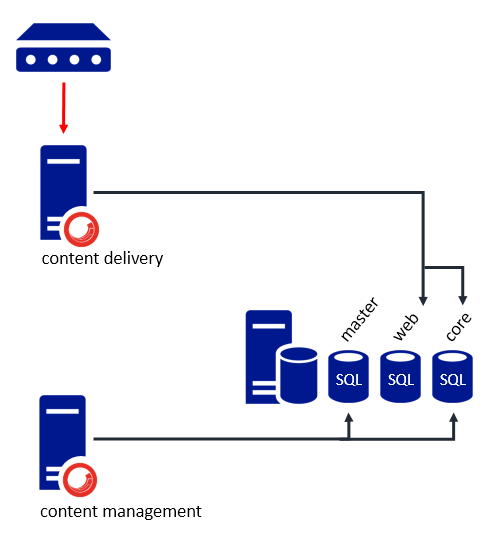
- Editors log in to the content management server to create and edit content. This content is stored in the master database on a separate database server.
- When content is published, it is moved from the master database to the web database by the content management server. In this example, this operation is performed by the content management server.
- The content delivery server presents content from the web database to visitors.
Experience Database (xDB)
The Experience Database (xDB) is responsible for collecting and processing analytics data. It is possible to use the Experience Management part of the platform without the Experience Database. This is sometimes referred to as 'CMS-Only Mode', although there is support a limited set of Experience Marketing features.
The xDB adds a number of additional server roles:
- A session state server is responsible for holding session data whilst a contact is active on a website.
- A collection server is responsible for hosting the collection database - a noSQL MongoDB that stores information about contacts and their interactions across all channels - web, mobile, and offline.
- A processing server is responsible for transforming data in the collection database into a format that can be used for reporting. This includes writing to a reporting database as well as a search index.
- A reporting database server is responsible for hosting the reporting database (SQL).
- A reporting service server is responsible for fetching data from a variety of sources, including the collection and reporting databases.
In an xDB context, content delivery servers are responsible for tracking a contact and gathering information about their session - such as pages they visited, and goals they triggered.
The following diagram shows a vertically scaled configuration where each role is performed by a dedicated server. This example also includes multiple content delivery servers.
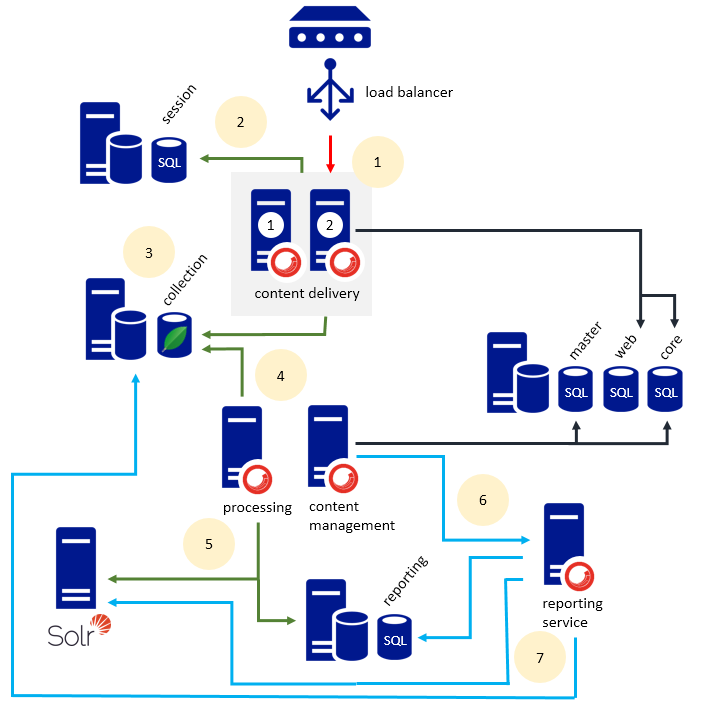
- A load balancer routes visitors to a CD server within a cluster. This particular cluster has two CD servers.
- The CD servers use out of process session management, meaning that visitors can bounce between CD servers during their visit and still maintain their session data. Out of process session state management is required in a scenario where there are multiple CD servers.
- When a visitor's session ends, data about their interaction is flushed to the xDB, which is a MongoDB database.
- A processing server is constantly polling the xDB for new data to be processed into formats to be used for reporting.
- Processing servers write data to an analytics index as well as a SQL reporting database. Managing indexes on Solr rather than Lucene is a technical requirement in many xDB configuration scenarios, and a general recommendation in any scaled environment.
- When a business user logs into the content management environment and accesses the Experience Profile or Experience Analytics reports, this request is routed via the reporting service.
- The reporting service is responsible accessing the collection database (MongoDB), the reporting database (SQL), and the analytics index.
Relationships Between Server Roles
The following list describes the relationships between server roles, including what databases each role connects to and why, as well as any web APIs that exist. This list assumes that there is at least one separate server per server role.
Configuring a server involves installing the entire Sitecore Experience Platform on that server and configuring Sitecore to perform a limited set of features. Servers whose sole function is to host databases (such as the collection database or reporting database) do not require Sitecore to be installed.
Content Delivery
Via Connection Strings
- Requires access to the core and web databases in order to deliver web content. For security reasons, is recommended that content delivery servers do not have access to the master database.
- Writes session data to a session state database as visitors interact with web content.
Writes to a collection database when a visitor's session ends.
Content Management
Via Connection Strings
- Writes to the collection database when new marketing assets - such as a goal or a campaign - are deployed
- Requires access to web, master, and core databases in order to manage and publish content
- Requires a connection to the reporting and reporting.secondary databases in order to rebuild the reporting database. This is because the interface that is used to rebuild the reporting database checks for the presence of
reportingandreporting.secondaryconnection strings, and will fail if they cannot be located.
Via Web API or Service
- Connects to a reporting service over when the Experience Analytics or Experience Profile interfaces.
- Requires access to Solr if choosing to use Solr for non-analytics related indexes (such as master, core, web, fxm, and list manager) - not to the sitecore_analytics index
Path Analyzer does not use the reporting service, and an additional path analyzer-specific service needs to be configured on all content management servers.
Reporting service
Via Connection Strings
- Needs access to the reporting database
- Needs access to the mongo database presumably?
- Needs access to Solr?
Via Web API or Service
Processing server
- Needs access to collection
- Needs access to reporting
- Needs access to solr indexes
- Needs access to master and core for some reason?
Modules and Connectors
Certain modules and connectors introduce additional components.
- EXM
- WFFM reporting database?
- Scaling commerce